ESP8266 OLED Weather Station: ThingPulse's Complete Project README
Original writeup by Daniel Eichhorn and ThingPulse and contributors
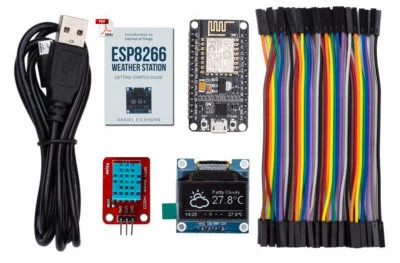
Photo credit
resources/ThingPulse-ESP8266-Weather-Station.jpeg
Daniel Eichhorn, ThingPulse and contributors · MITResized without cropping and converted to WebP.
Before you build
Start here if you want a small connected display rather than an outdoor sensor station. The README explains the Arduino libraries and weather-service configuration, then records changes to older APIs. It describes downloaded weather data, not a measurement instrument. Check the current OpenWeatherMap requirements before buying parts: historical free-tier and pricing statements below belong to the original source.
Daniel Eichhorn and ThingPulse's compact Wi-Fi weather display, with the full setup instructions, library notes, and original project photograph.
ThingPulse ESP8266 Weather Station
PlatformIO Registry PlatformIO CI
This code works best with the NodeMCU V2 ESP8266 module and an 0.96" OLED display. To get you up and running in no time we created a kit which contains all the necessary parts: https://thingpulse.com/product/esp8266-iot-electronics-starter-kit-weatherstation-planespotter-worldclock/
By buying this and other kits from us you are funding maintenance and development of this library. Thank you!
Photo credit
resources/ThingPulse-ESP8266-Weather-Station.jpeg
Daniel Eichhorn, ThingPulse and contributors · MITResized without cropping and converted to WebP.
Service level promise
| Original media | This is a ThingPulse prime project. See our open-source commitment declaration for what this means. |
Install and configure Arduino IDE
Make sure you use a version of the Arduino IDE which is supported by the ESP8266 platform. Follow the tutorial on our documentation platform.
Install libraries in Arduino IDE
Install the following libraries with your Arduino Library Manager in Sketch > Include Library > Manage Libraries...
- ESP8266 Weather Station
- JSON Streaming Parser by Daniel Eichhorn
- ESP8266 OLED Driver for SSD1306 display by Daniel Eichhorn. Use Version 3.0.0 or higher!
Prepare the software
- Create an API Key for OpenWeatherMap
- In the Arduino IDE go to
File>Examples>ESP8266 Weather Station>Weather Station Demo - Enter the OpenWeatherMap API Key
- Enter your WiFi credentials
- Adjust the location according to OpenWeatherMap API, e.g. Zurich, CH
- Adjust UTC offset
Setup for PlatformIO
If you are using the PlatformIO environment for building
- choose one of the available IDE integration or the Atom based IDE
- install libraries 561, 562 and 563 with "platformio lib install"
- adapt the WeatherStationDemo.ino file to your needs (see details above)
Available Modules
- Time Client: simple class which uses the header date and time to set the clock
- NTP Client: a NTP based time class written by Fabrice Weinberg
- OpenWeatherMap Client: A REST client for the OpenWeatherMap.com service, providing weather information
- Aeris Client: Client for the service provided by aerisweather.com. Fully functional initial version. After the Wunderground incident (see upgrade notes) we first targeted Aeris before we settled with OpenWeatherMap. This code is unmaintained but will remain part of this library for the time being.
- Thingspeak Client: fetches data from Thingspeak which you might have collected with another sensor node and posted there.
- Astronomy: algorithms to calculate current lunar phase and illumination.
- SunMoonCalc: a calculator for sun and moon properties for a given date & time and location. This implementation is port of a Java class by T. Alonso Albi from OAN (Spain).
Why Weather Station as a library?
I realized that more and more the Weather Station was becoming a general framework for displaying data over WiFi to one of these pretty displays. But everyone would have different ways or sources for data and having the important part of the library would rather be the classes which fetch the data then the main class. So if you write data fetchers which might be of interest to others please contact me to integrate them here or offer your code as extension library yourself and call it something like esp8266-weather-station-. We will gladly list it here as third party library...
Upgrade Notes
Version 2, January 2020, removes WU support, see below
Replace Wunderground with OpenWeatherMap as weather data provider
The weather information provider we used so far (Wunderground) recently stopped their free tier without previous notice on May 15, 2018. This release adds support for a new provider with a free tier for weather information: OpenWeatherMap.com. The basic demo (WeatherStationDemo) has been adapted to use this new API through the OpenWeatherMapCurrent and OpenWeatherMapForecast REST clients.
Sadly OpenWeatherMap provides less information than Wunderground did (or still does). If you are missing attributes in the response documents then please contact the OpenWeatherMap team.
ESP8266 OLED Library upgrade
The ESP8266 OLED Library changed a lot with the latest release of version 3.0.0. We fixed many bugs and improved performance and changed the API a little bit. This means that you might have to adapt your Weather Station Code if you created it using the older 2.x.x version of the library. Either compare your code to the updated WeatherStationDemo or read through the upgrade guide
Deprecation notes
| Announcement | Module | Removal |
|---|---|---|
| 2024-09-19 | OWM requests by city name and city ID, see their documentation | |
| 2018-06-13 | all Wunderground related code, see our blog for details | January 2020, version 2.0.0 |
Source and license
Original documentation: Daniel Eichhorn, ThingPulse and contributors. Reproduced under MIT. Individual image credits identify any separately licensed media. The full original copyright and permission notice is retained in that license file.
Republished the complete README text. Reformatted HTML as Markdown, resolved relative links, and served repository images locally. Photos resized without cropping; diagrams retain source resolution. Externally hosted or separately unverified media is linked at its original location. Introductory selection notes are by Meteor Makers; the original author is not responsible for those notes.
Source revision: 5f92e98c0718. Retrieved 2026-10-03. This is a source snapshot, not a claim that the project was first published today or that its creator endorses Meteor Makers.
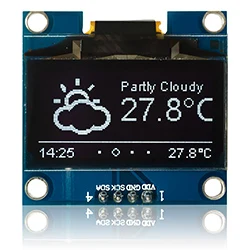
Photo credit
resources/CurrentWeatherReflection.jpg
Daniel Eichhorn, ThingPulse and contributors · MITResized without cropping and converted to WebP.