MiniTeensy: Build a Six-Voice Synth with Teensy 4.1
Original writeup by Nick Culbertson
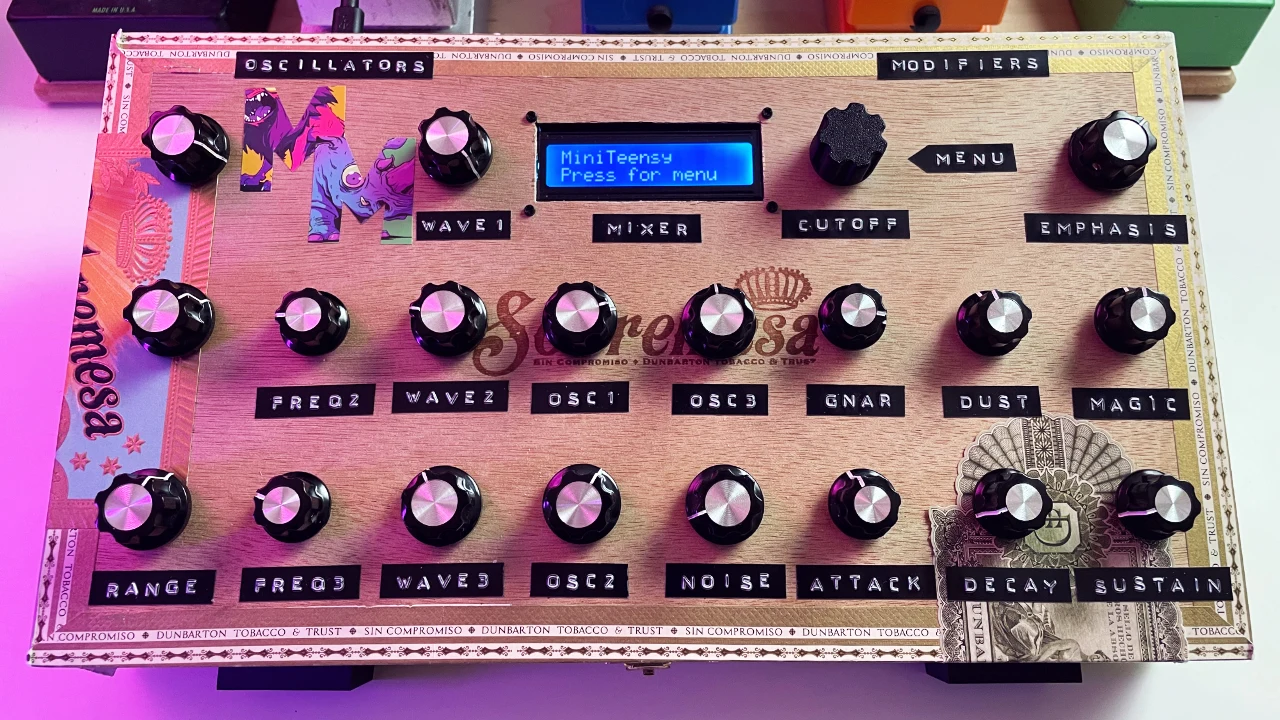
Photo credit
Before you build
The source offers a minimal LCD-and-encoder build and a fuller hands-on control panel, alongside a USB-only configuration. Read the version notes before wiring: the v1.1 update changes menu-encoder pins and an amp-attack encoder connection. USB audio/MIDI is the documented current audio path; the standalone and DIN options have extra hardware or code requirements. This is a virtual-analog tribute, not a product affiliated with Moog. All original pin tables, installation steps, test sequence, and contributor acknowledgments are retained.
Nick Culbertson's full MiniTeensy README, original finished-instrument photograph, minimal and twenty-encoder wiring layouts, USB audio/MIDI setup, and testing sequence.
MiniTeensy Synth
A 6-voice polyphonic virtual analog synthesizer built with the Teensy 4.1 microcontroller, inspired by the classic Minimoog. Features comprehensive synthesis with USB audio/MIDI and intuitive menu control.
Video: DIY Minimoog Inspired Synth | A Teensy Powered Tribute
Project featured on Synth Anatomy, Synthtopia, and Matrix Synth! 🚀
Key Features
- 6-voice polyphony with 3 oscillators per voice (18 total)
- 6 waveforms per oscillator
- Noise shared white/pink noise
- 24dB Moog-style ladder filter with ADSR envelopes
- Independent LFO with pitch/filter/amp targets
- Macro knob system - remap filter knobs to LFO controls
- USB Audio + MIDI - single cable to computer
- MIDI channel selection - receive on specific channel or omni mode
- 20 hardware encoders + LCD for real-time control
- 20 Presets - 80s Brass, Saw Keys, Bass sounds, Pads, and more
- Multiple play modes - Mono, Poly, Legato with glide
Recent Updates
v1.1 - December 2025
- Added MIDI Host Support
- Added MIDICC Support
BREAKING CHANGE Menu encoder pin assignments changed to fix encoder timing issues:
- Menu Encoder CLK: Pin 13 → Pin 14
- Menu Encoder DT: Pin 14 → Pin 15
- Menu Encoder SW: Pin 15 → Pin 16
For existing builds: Swap CLK wire from pin 13 to pin 14, and SW wire from pin 15 to pin 16. Move enc18 DT (Amp Attack) encoder from pin 16 to 51 (under the Teensy).
Need the old version? Use v1.0 release for original pin assignments.
Hardware Requirements
NOTE: ENABLE YOUR HARDWARE SETUP IN CONFIG.H - You can build this with no additional components if you use USB audio and USB MIDI. Params are changed with MIDICC and you can change preset with Program Changes.
Full Build:
- Teensy 4.1 microcontroller
- 19x Rotary Encoders + 1x Menu Encoder with push button
- 16x2 I2C LCD display
- Enclosure, knob caps, hookup wire
If using the Teensy's MIDI Host enable USE_MIDI_HOST in config.
Minimal Build:
- Teensy 4.1 + 1x Menu Encoder + LCD
- USB cable for audio/MIDI output
- All parameters accessible via menu system
Parts:
- Teensy 4.1 (https://www.sparkfun.com/teensy-4-1-without-ethernet.html)
- Menu Encoder (https://www.amazon.com/Taiss-KY-040-Encoder-15×16-5-Arduino/dp/B07F26CT6B/ref=sr_1_3_pp)
- Other Encoders (https://www.aliexpress.us/item/3256801237549169.html)
- LCD 2X16 (https://www.amazon.com/Hosyond-Display-Module-Arduino-Raspberry/dp/B0BWTFN9WF/ref=sr_1_2)
- Knobs (https://www.amazon.com/Taiss-Silver-Rotary-Potentiometer-Diameter/dp/B07F25NMJ7/ref=sr_1_5)
Detailed Wiring & Pinout
Teensy 4.1 Complete Pinout Assignment
                    Teensy 4.1 Pinout Map
    ┌─────┐                                  ┌─────┐
    │  0  │ enc3 CLK (Osc3 Range)         5V │ VIN │ LCD Power
    │  1  │ enc3 DT  (Osc3 Range)            │ GND │ All encoders daisy-chained to ground + LCD and Menu
    │  2  │ enc2 CLK (Osc2 Range)            │ 3V  │ Menu Encoder Power
    │  3  │ enc2 DT  (Osc2 Range)            │ 23  │ enc15 CLK (Filter Decay/LFO Depth)
    │  4  │ enc1 CLK (Osc1 Range)            │ 22  │ enc15 DT  (Filter Decay/LFO Depth)
    │  5  │ enc1 DT  (Osc1 Range)            │ 21  │ enc11 CLK (Osc3 Volume)
    │  6  │ enc5 CLK (Osc2 Fine)             │ 20  │ enc11 DT  (Osc3 Volume)
    │  7  │ enc5 DT  (Osc2 Fine)             │ 19  │ SCL (LCD I2C) LCD Clock
    │  8  │ enc4 CLK (Osc1 Fine)             │ 18  │ SDA (LCD I2C) LCD Data
    │  9  │ enc4 DT  (Osc1 Fine)             │ 17  │ enc18 CLK (Amp Attack)
    │ 10  │ enc8 CLK (Osc3 Wave)             │ 16  │ Menu Encoder SW (Push Button)
    │ 11  │ enc8 DT  (Osc3 Wave)             │ 15  │ Menu Encoder DT (Filter Cutoff when not in menu)
    │ 12  │ enc7 CLK (Osc2 Wave)             │ 14  │ Menu Encoder CLK (Filter Cutoff when not in menu)
    └─────┘                                  │ 13  │ Blank (LED Pin)
                                             └─────┘
    │ 24  │ enc7 DT  (Osc2 Wave)             │ 41  │ enc14 DT  (Filter Attack/LFO Rate)
    │ 25  │ enc6 CLK (Osc1 Wave)             │ 40  │ enc20 CLK (Amp Sustain)
    │ 26  │ enc10 DT (Osc2 Volume)           │ 39  │ enc20 DT  (Amp Sustain)
    │ 27  │ enc6 DT  (Osc1 Wave)             │ 38  │ enc19 CLK (Amp Decay)
    │ 28  │ enc10 CLK(Osc2 Volume)           │ 37  │ enc19 DT  (Amp Decay)
    │ 29  │ enc9 CLK (Osc1 Volume)           │ 36  │ enc16 CLK (Filter Sustain/LFO Target)
    │ 30  │ enc9 DT  (Osc1 Volume)           │ 35  │ enc16 DT  (Filter Sustain/LFO Target)
    │ 31  │ enc17 CLK(Noise Volume)          │ 34  │ enc13 CLK (Filter Resonance)
    │ 32  │ enc17 DT (Noise Volume)          │ 33  │ enc13 DT  (Filter Resonance)
    └─────┘                                  │     │
                                             │ 50  │ enc14 CLK (Filter Attack/LFO Rate) (Under the Teensy)
                                             │ 51  │ enc18 DT  (Amp Attack)             (Under the Teensy)
                                             │ 52  │
                                             └─────┘
Minimal Build (LCD + 1 Encoder)
Perfect for testing or easier builds:
Menu Encoder Connections:
Menu Encoder Pin    →  Teensy 4.1 Pin    │  Function
─────────────────────────────────────────┼─────────────
SW (Push Button)    →  16                │  Menu Select
CLK                 →  14                │  Rotary Clock
DT                  →  15                │  Rotary Data
VCC                 →  3.3V              │  Power (3.3V)
GND                 →  GND               │  Ground
LCD I2C Connections:
LCD Pin    →  Teensy 4.1 Pin    │  Function
────────────────────────────────┼─────────────────
VCC        →  5V (VIN)          │  Power
GND        →  GND               │  Ground
SDA        →  18                │  I2C Data
SCL        →  19                │  I2C Clock
Power:
- Single USB cable to computer provides power and audio/MIDI
That's it! All synthesis parameters accessible through menu.
Full Build (20 Encoders) - Complete Wiring
All Encoder Connections:
Function            │ Encoder │ CLK Pin │ DT Pin  │ Purpose
────────────────────┼─────────┼─────────┼─────────┼──────────────────────
Osc1 Range          │  enc1   │    4    │    5    │ Footages: 32', 16', 8', 4', 2'
Osc2 Range          │  enc2   │    2    │    3    │ Footages: 32', 16', 8', 4', 2'
Osc3 Range          │  enc3   │    0    │    1    │ Footages: 32', 16', 8', 4', 2'
Osc1 Fine Tune      │  enc4   │    8    │    9    │ ±7 semitone detune
Osc2 Fine Tune      │  enc5   │    6    │    7    │ ±7 semitone detune
Osc1 Waveform       │  enc6   │   25    │   27    │ Triangle, Sawtooth, Square, Pulse, etc.
Osc2 Waveform       │  enc7   │   12    │   24    │ Triangle, Sawtooth, Square, Pulse, etc.
Osc3 Waveform       │  enc8   │   10    │   11    │ Triangle, Sawtooth, Square, Pulse, etc.
Osc1 Volume         │  enc9   │   29    │   30    │ Mixer level control
Osc2 Volume         │ enc10   │   28    │   26    │ Mixer level control
Osc3 Volume         │ enc11   │   21    │   20    │ Mixer level control
Menu Navigation     │ menu    │   14    │   15    │ Main interface (SW→16) / Filter Cutoff when not in menu
Filter Resonance    │ enc13   │   34    │   33    │ Resonance Q factor
Filter Envelope Amt │ enc14   │   50    │   41    │ Attack / LFO Rate*
Filter Decay        │ enc15   │   23    │   22    │ Decay / LFO Depth*
Filter Sustain      │ enc16   │   36    │   35    │ Sustain / LFO Target*
Noise Volume        │ enc17   │   31    │   32    │ White/Pink noise mix level
Amp Attack          │ enc18   │   17    │   51    │ Envelope attack time
Amp Decay           │ enc19   │   38    │   37    │ Envelope decay time
Amp Sustain         │ enc20   │   40    │   39    │ Envelope sustain level
*Macro Mode: enc14/enc15/enc16 switch between Filter envelope and LFO controls
Standard Encoder Wiring (for each encoder):
Encoder Terminal    →  Connection             │  Notes
──────────────────────────────────────-───────┼──────────────────────
CLK                 →  Specific Teensy pin    │  See table above
DT                  →  Specific Teensy pin    │  See table above
GND/-               →  Common ground bus      │  Daisy-chain ALL grounds
IMPORTANT - Ground Connections: All encoder GND pins must be connected together and to Teensy GND:
- Daisy-chain method: Connect GND wire from encoder 1 → encoder 2 → encoder 3 → ... → Teensy GND
Power Distribution:
Power Rail     │  Source        │  Connects To
───────-───────┼────────────────┼─────────────────────────────
5V             │  USB port      │  Teensy VIN, LCD VCC
3.3V           │  Teensy 4.1    │  Menu Encoder VCC
GND            │  Teensy 4.1    │  All encoder GND, LCD GND
Testing Procedure:
- Power test: Connect only Teensy + LCD, verify LCD backlight
- Menu test: Add menu encoder, verify menu navigation works
- Encoder test: Add other control encoders
- Audio test: Connect to computer, verify "Teensy Audio" device appears
- MIDI test: Send MIDI notes, verify synthesis works
Audio + MIDI Options
Option 1: Computer DAW (Current Setup)
- Single USB cable provides audio output + MIDI input
- Plug-and-play with some DAWs
Option 2: Standalone with MIDI Keyboard
For standalone use without computer:
- Connect USB MIDI keyboard to Teensy USB Host pins
- Requires USB Host cable
- Audio output through computer USB (or modify code for I2S/line out)
- Note: Requires code modification for USB Host MIDI instead of USB Device
Option 3: DIN MIDI Support (Hardware Modification) Add traditional 5-pin DIN MIDI input for hardware compatibility:
Hardware Required:
- 6N138 optocoupler IC
- 220Ω resistor
- 5-pin DIN MIDI connector
- Standard MIDI interface circuit (see MIDI spec)
Wiring:
- Connect MIDI interface circuit output to Teensy Serial1 (Pin 0)
- MIDI input circuit connects to DIN connector pins 4,5
- Important: Pin 0 is currently used by enc3 (Osc3 Range). You'll need to move enc3's CLK wire from Pin 0 to one of the surface mount pins on the bottom of the Teensy 4.1 board (pins 42-47 are available)
Code Changes Required:
// In Mini-Teensy-Synth.ino, uncomment this line:
#define ENABLE_DIN_MIDI

// That's it! The DIN MIDI support code is already included.
Features:
- Supports both USB MIDI and DIN MIDI simultaneously
- Selectable MIDI channel (1-16 or Omni) via Settings menu
- Standard MIDI implementation (Note On/Off, CC, Pitch Bend)
Software Installation
- Install Arduino IDE 2.0+ from arduino.cc
- Add Teensy support:
- Modern IDE: Tools → Board Manager → Search "Teensy" → Install
- Fallback: Download Teensyduino from PJRC
- Install libraries: Tools → Manage Libraries → Install "LiquidCrystal I2C" and "Encoder"
- For DIN MIDI: Also install "MIDI Library" by Francois Best
- Download this project and open
Mini-Teensy-Synth.ino - Configure: Board→Teensy 4.1, USB Type→Audio+MIDI
- Upload! Your computer will show "Teensy Audio" device
Usage
Menu Navigation: Click encoder to navigate, turn to adjust values. All parameters accessible via hierarchical menu system.
Macro Knobs: Settings → Macro Knobs toggles filter envelope controls between Filter (Attack/Decay/Sustain) and LFO (Rate/Depth/Target) modes.
MIDI Channel: Settings → MIDI Channel sets which MIDI channel to receive (1-16, or Omni for all channels).
Menu Structure:
Presets | OSC 1-3 | Noise | Envelopes | Filter | LFO | Voice Mode | Settings
Contributing
Fork, test on hardware, submit PR. Open source project!
Thanks
- PJRC - Teensy platform and Audio Library
- Minimoog - The OG
- Open source community
This project was developed with assistance from Claude Code.
Source and license
Original documentation: Nick Culbertson. Reproduced under MIT. Individual image credits identify any separately licensed media. The full original copyright and permission notice is retained in that license file.
Republished the complete README text. Reformatted HTML as Markdown, resolved relative links, and served repository images locally. Photos resized without cropping; diagrams retain source resolution. Externally hosted or separately unverified media is linked at its original location. Introductory selection notes are by Meteor Makers; the original author is not responsible for those notes.
Source revision: 0abee0f6af64. Retrieved 2026-10-03. This is a source snapshot, not a claim that the project was first published today or that its creator endorses Meteor Makers.