Build an ESP32 E-Paper Weather and Sensor Display
Original writeup by Jakub Jaszczur
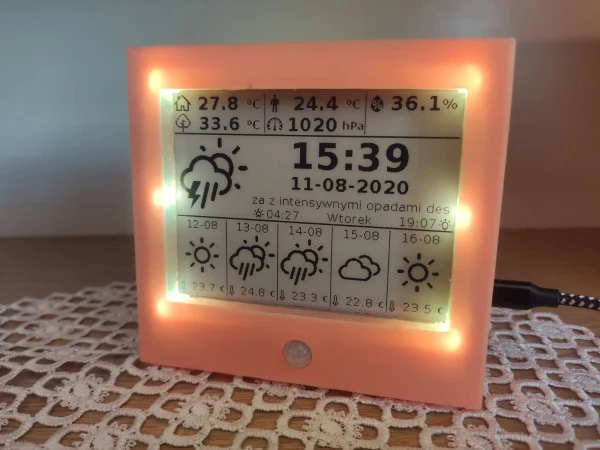
Photo credit
Before you build
This is a receiver: local sensors supply indoor readings, while a separate MQTT system supplies time and outside forecasts. You will need that upstream data service as well as the pictured display. Important correction to the historical README: the CCS811 reports equivalent CO2 estimated from gas sensing, not a direct CO2 concentration measurement. Do not treat this hobby display as a safety alarm or a calibrated air-quality instrument. See the CCS811 sensor documentation. The source's 2020 component prices are historical.
Jakub Jaszczur's complete MQTT receiver guide, with the original finished-build and enclosure photographs, sensor list, display diagram, configuration examples, and PCB schematic.
Epaper Weather Station Receiver
Photo credit
1. Introduction
The project is a part of bigger IOT system. Weather Station receiver measures basic parameters, such as temperature, pressure, humidity, but also CO2, TVOC level. Other parameters, like outside temperature, weather forecast can be received by MQTT and displayed on 4.2" Epaper display.
2. Features
- 4.2" E-paper display with additional NeoPixel backlight
- Backlight colour depends on CO2 in room
- Li-Ion battery as backup PS
- Additional fan for better air flow
- Temperature, humidity, pressure measurements
- CO2, TVOC level measurements
- PIR sensor
- Time, date, sunrise/sunset time display
- Current weather forecast with description
- Weather forecast for next 5 days
- Outside temperature, felt temperature display
- All displayed parameters/icons can be easily changed
- All not measured parameters are send to/from weather station by MQTT
3. Bill of Materials
Main components:
| Device | Description | Price |
|---|---|---|
| ESP32 DEVKIT V1 | Main IC | $3.50 |
| BME280 | Temperature, humidity, pressure sensor | $2.10 |
| MCP9808 | High accuracy temperature sensor | $0.75 |
| CCS811 | CO2, TVOC sensor | $5.89 |
| HC-SR505 | PIR sensor (AM312) | $1.15 |
| J5019 | Battery charger with DC-DC converter | $0.69 |
| 4.2" Epaper | Waveshare E-paper Display Module | $28.47 |
| 25mm fan | 5V fan (25x25x7mm) | $1.22 |
| SK6812 | RGBW NeoPixel LED | $0.25 |
| 1000mAh Li-Ion | Battery | $2.50 |
| PCB | Custom PCB | |
| Housing | Custom housing (3D printed) |
4. Libraries
- GxEPD
- Adafruit GFX
- PubSubClient
- ArduinoJson
- Adafruit MCP9808
- Adafruit BME280
- Adafruit Sensor
- Adafruit CCS811
- Adafruit NeoPixel
5. Getting Started
To run Weather Station, user should change some settings in data.h file:
Basic WiFi settings
// WiFi Settings
const char* ssid = "YOUR_SSID";
const char* password = "YOUR_PASSWORD";
Choose, how many NeoPixel LEDs you want to use. You can solder up to 10 LEDs. If you use less than 10, you should make shorts everywhere, where you do not use LEDs (Designators R2 to R7)
// NeoPixel settings
 ...
#define LED_COUNT   6       // No of LEDs
Uncomment, if you use MQTT user and password
// MQTT Settings
const char* mqtt_server = "MQTT_SERVER_IP";
//const char* mqtt_user = "MQTT_USER";
//const char* mqtt_password = "MQTT_PASSWORD";
You can adjust, how often display will be refreshed, and how often presence will be checked using PIR sensor (it also defines minimum backlight time)
// Refresh time in seconds
#define REFRESH_TIME	30
#define PRESENCE_TIME   5
Define altitude of your home (for pressure measurements)
// Sensors config data
#define ALTITUDE        515.0 //define altitude of location
Define MQTT Publish and Subscribe topics compatible with your server
// MQTT Input topics
#define TEMPOUT_TOPIC       "home/weatherstation/tempout"
#define TIME_TOPIC          "basic/time/time"
#define DATE_TOPIC          "basic/time/date"
#define SUNRISE_TOPIC       "conditions/weather/sunrise"
#define SUNSET_TOPIC        "conditions/weather/sunset"
#define DESCRIPTION_TOPIC   "conditions/weather/description"
#define WEEKDAY_TOPIC       "basic/time/day"
#define WEATHER_ICON_TOPIC  "conditions/weather/icon"
#define FELT_TEMP_TOPIC     "conditions/weather/tempfeel"
#define FORECAST1_TOPIC     "forecast1"
#define FORECAST2_TOPIC     "forecast2"
#define FORECAST3_TOPIC     "forecast3"
#define FORECAST4_TOPIC     "forecast4"
#define FORECAST5_TOPIC     "forecast5"

// MQTT Output topics
#define PUBLISH_TOPIC       "home/station"
6. Description
The main functionality of Weather Station is to measure inside conditions and display parameters on Epaper display.
Measurements
- ****Temperature: measured by MCP9808 to ensure high accuracy (0,25ºC)
- ****Humidity, Pressure: measured by BME280
- ****CO2, TVOC: measured by CCS811
- ****Presence: measured by HC-SR505 PIR sensor, used to detect presence and to switch ON backlight
- ****Other: battery voltage can be measured using analog input
Display
Not all measured parameters are displayed on Epaper. I use only few most important indicators.
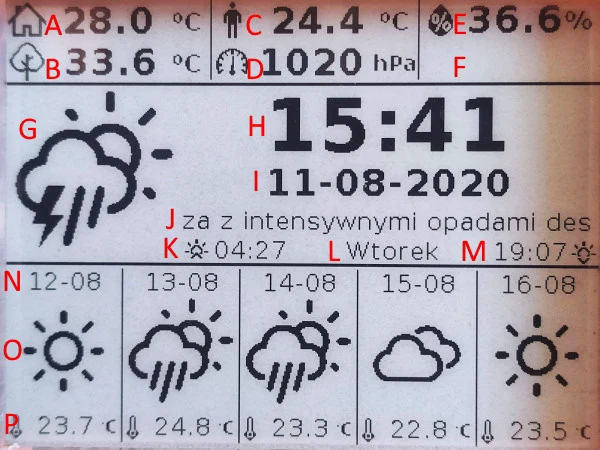
Photo credit
****A Temperature inside (measured) ****B Temperature outside (MQTT) ****C Felt temperature (MQTT) ****D Pressure inside (measured) ****E Humidity inside (measured) ****F Empty space, to be used ****G Actual weather icon (MQTT) ****H Time (MQTT) ****I Date (MQTT) ****J Weather description (MQTT) ****K Sunrise time (MQTT) ****L Day of week (MQTT) ****M Sunset (MQTT) ****N Forecast date (MQTT) ****O Forecast icon (MQTT) ****P Forecast temperature (MQTT)
Input parameters
All MQTT subscribed topics should provide data in format:
| Topic | Type | Example | Note |
|---|---|---|---|
| TEMPOUT_TOPIC | String | 30.75 | |
| TIME_TOPIC | String | 10:02 | |
| DATE_TOPIC | String | 12-08-2020 | |
| SUNRISE_TOPIC | String | 04:29 | |
| SUNSET_TOPIC | String | 19:06 | |
| DESCRIPTION_TOPIC | String | Sunny | |
| WEEKDAY_TOPIC | String | Monday | |
| WEATHER_ICON_TOPIC | String | 1 | See picture below |
| FELT_TEMP_TOPIC | String | 31.56 | |
| FORECASTx_TOPIC | JSON | See example below | |
| SERVICE_TOPIC | String | See service |
Weather Icons codes
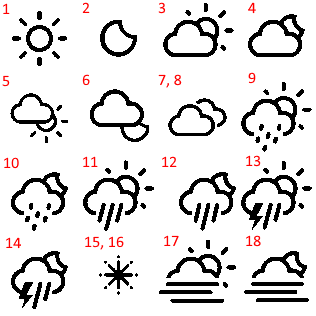
Photo credit
Forecast JSON example
{
"time1":"12-08",
"icon1":"1",
"temp1":22.23
}
Output parameters
Parameters send by device in PUBLISH_TOPIC are in JSON format:
{
"tempIn":24.7,
"humIn":44.9248,
"pressIn":1022.372,
"co2":1065,
"tvoc":101,
"bat":4.174172
}
Service commands
Some simple service commands can be send to Station using SERVICE_TOPIC:
RESTART - force ESP restart
SENSORS - send sensors statuses, 1 if sensor was correctly initialized
STATUS - send online time
Feedback will be send in DEBUG_TOPIC
7. Changelog
2021-01-10 ****V1.0 Stable version - little bit optimized, added STL files
2020-08-25 ****V0.1.5 Stable beta - not optimized, without STL files (Public)
2020-08-11 ****V0.1 First Beta Release - not optimized, without firmware code (private)
8. Task list
- Software:
- Firmware code optimization
- Service commands (sensors statuses, online time)
- Battery voltage measurements
9. Pictures
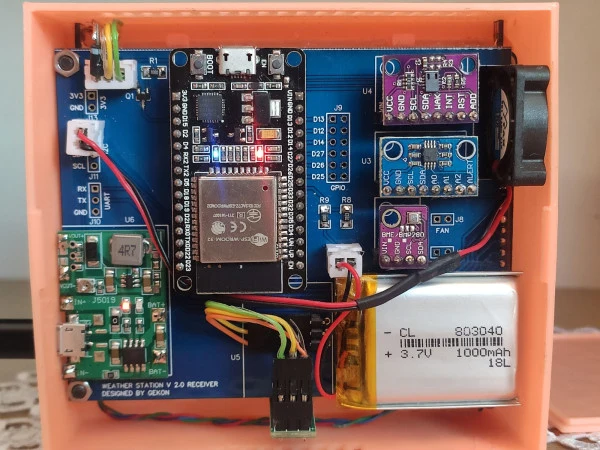
Photo credit
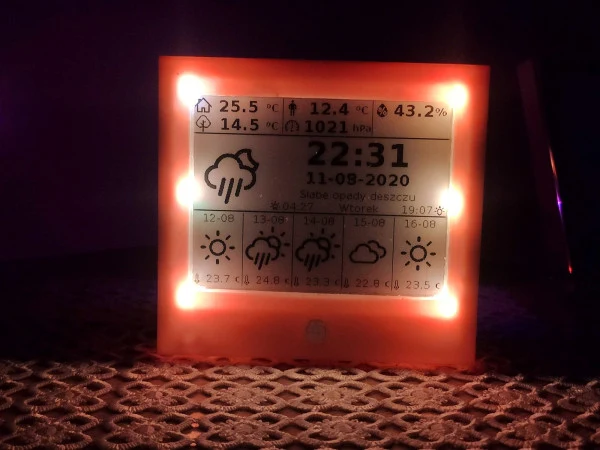
Photo credit
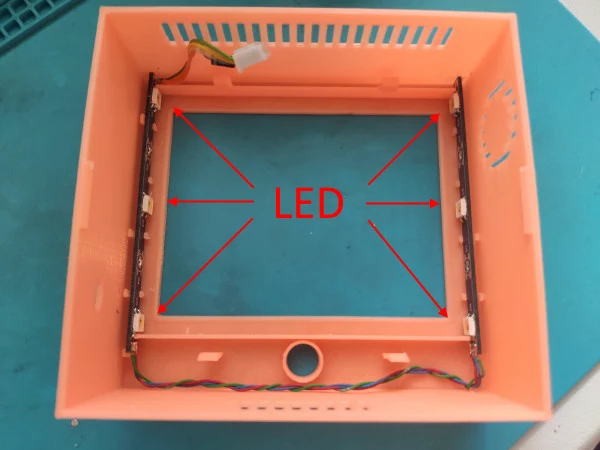
Photo credit
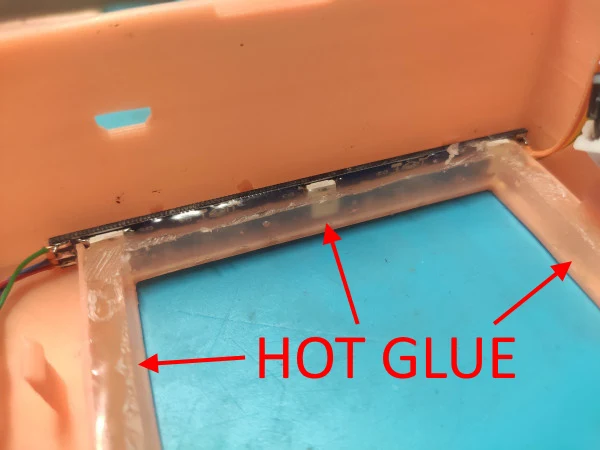
Photo credit
Original Build Downloads
Schematic_Weather Station 2.0 - Receiver_2020-08-11_12-13-11.pdf
Source and license
Original documentation: Jakub Jaszczur. Reproduced under MIT. Individual image credits identify any separately licensed media. The full original copyright and permission notice is retained in that license file.
Republished the complete README text. Reformatted HTML as Markdown, resolved relative links, and served repository images locally. Photos resized without cropping; diagrams retain source resolution. Externally hosted or separately unverified media is linked at its original location. Introductory selection notes are by Meteor Makers; the original author is not responsible for those notes. Original build downloads are mirrored byte-for-byte; added a download index.
Source revision: 6d8e6fe38ad9. Retrieved 2026-10-03. This is a source snapshot, not a claim that the project was first published today or that its creator endorses Meteor Makers.